
The primary module to review your wireless inventory is in the Inventory page. To access this report-type page,
-
Go to the Inventory.
-
Click on Wireless.
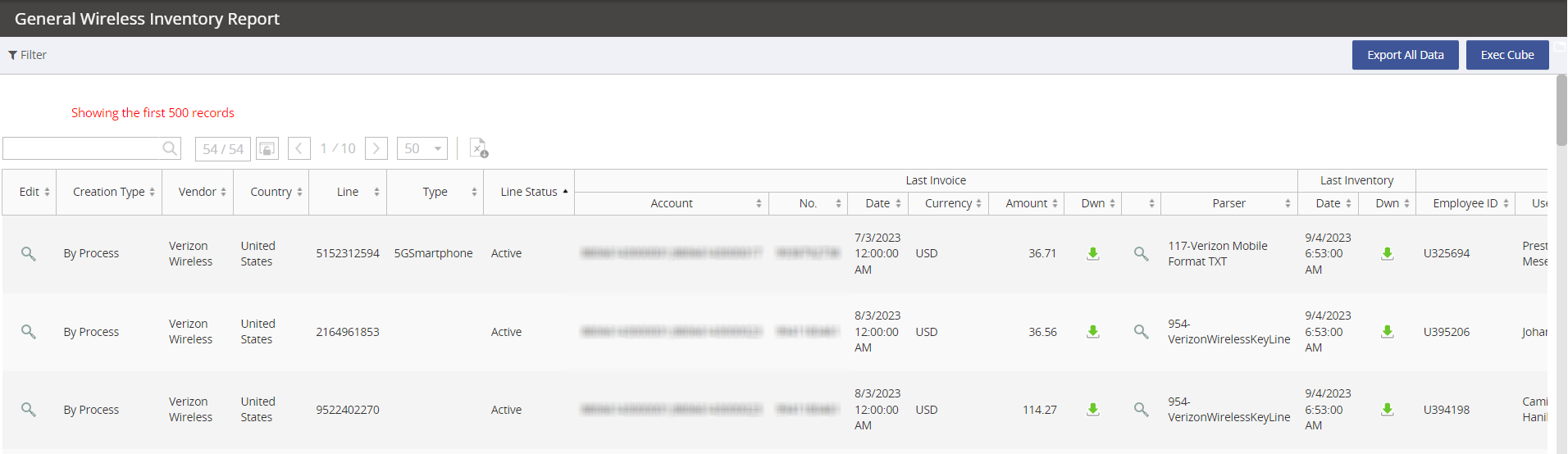
Standard columns available
|
Column |
Description |
|---|---|
|
Vendor |
The vendor name. |
|
Country |
|
|
The unique billing service item. |
|
|
Line Status |
Is the service Active or Inactive? |
|
Last Invoice - Date |
The date of the last invoice received for the inventory service. |
|
Last Invoice - Currency |
The invoice currency. |
|
Last Invoice - Amount |
The total invoice amount (current charge). |
|
Last Invoice - Dwn |
Download the last invoice. |
|
Last Invoice - Parser |
The name of the invoice parser. |
|
Last Inventory - Date |
The date of the last inventory data capture. |
|
Last Inventory - Dwn |
Download the inventory file. |
|
User Assignation - Employee ID |
If assigned, the employee ID will populate |
|
User Assignation - User Name |
If assigned, the employee first and last name will populate |
|
User Assignation - Email |
If assigned, the employee email will populate |
|
User Assignation - User Status |
If assigned, the employee status (Active or Inactive) will populate |
|
User Assignation - Assignment Status |
Is this service assigned to an employee? |
|
User Assignation - Building |
If assigned, the employee’s associated location will populate |
|
User Assignation - Building Code |
If assigned, the employee’s associated location code will populate |
|
User Assignation - CC |
If assigned, the employee’s associated Cost Center will populate |
|
HR Building Code |
If associated directly to a location, the building code will populate |
|
Plan |
The last billing rate plan for the service |
|
Device - Type |
If a device is defined, the Type will populate. Examples of a device type are: Smartphone, Aircard, Tablet. |
|
Device - Brand |
The device brand, such as Apple or Samsung. |
|
Device - Manufacturer |
Often times the Brand & Manufacture are the same. |
|
Device - Brand Model |
This is the specific device make/model, such as the iPhone 14 128GB Midnight. |
|
Device - Platform |
The type of platform is running on the device, such as Apple iOS, Google Android and Microsoft's Windows Phone OS. |
|
Device - IMEI |
If a device is associated, the IMEI will appear. |
|
Device - Serial Number |
If a device is associated, the Serial Number will appear. |
|
Device - Status |
Is this an active device? Yes or No. |
|
Device - History |
Keep track of the device Brand Model changes, IMEI, and Serial Number changes. Click on the spyglass to open a pop-up window. 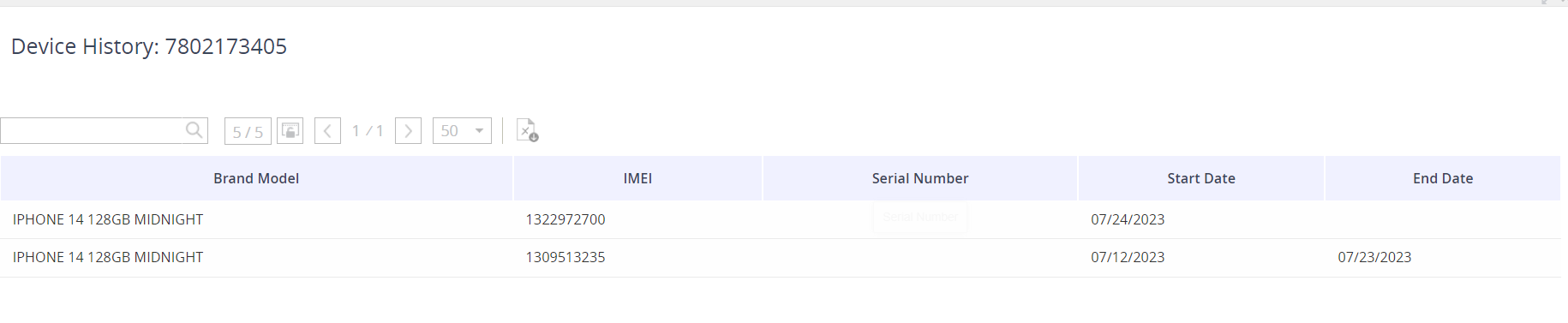
|
|
GL - Edit |
Edit the GL Code associated to the service. |
|
GL - Count |
Are there multiple GL Codes associated to the service? |
|
GL - Ledger Code String |
The current GL String value associated to the service. |
|
GL - Update User |
The name of the user who last updated to the GL value. |
|
GL - Update Date |
The date of the last time the GL value was updated. |
|
GL - WBS |
Is the GL derived from the employee association? |
|
Upgrade Date |
When is the service eligible for an upgrade? |
|
Contract Start |
When did the contract start for the service? |
|
Contract End |
When is the contract end for the service? |
|
Service Cost |
The last invoice cost for the service. |
|
Custom fields! |
We support client custom fields - so you may see other columns that were set up just for you! |